CSS Selectors 101: Targeting Elements with Precision
Why Do We Even Need CSS Selectors?
Imagine a webpage with:
20 paragraphs
10 headings
5 buttons
Now imagine you want only one paragraph to be red.
How does CSS know which paragraph you mean?
That’s exactly why CSS selectors exist.
CSS selectors are the way we tell the browser which elements to style.
Without selectors, CSS would have no direction — everything would look the same.
What Are Selectors?
Think of CSS selectors as ways to choose elements. Before you can style anything, you have to select it first. They are the absolute foundation of CSS. If you cannot select it, you cannot style it.
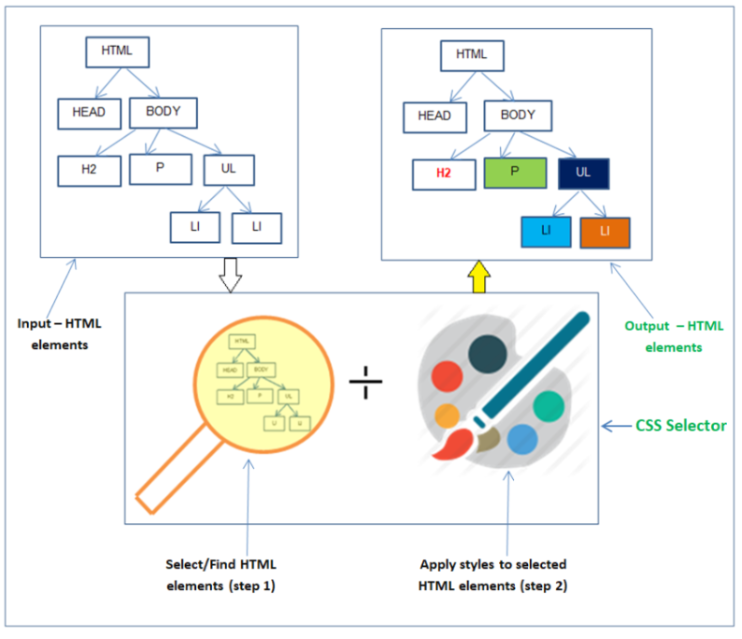
To understand this better, let’s use a real-world analogy.
Imagine you are standing on a stage in front of a giant, crowded auditorium. You have a microphone, and you want to give instructions to the audience. The audience members are like your HTML elements.
How do you address them?
Broad address: You could shout, "Hey everyone!" (Everyone looks up).
Group address: You could shout, "Everyone wearing a red shirt, stand up!" (A specific group looks up).
Specific address: You could shout, "John Smith in seat 4B, please come to the stage." (Only one specific person moves).
CSS selectors work exactly the same way. Let’s look at how we do this in code.
The Big Three: Element, Class, and ID
1. The Element Selector (The "Broad Brush")
This selects all elements of a specific type.
Syntax: Just the tag name (no dots or hashes).
Use Case: "I want every paragraph on my site to use the same font."
p {
    color: gray;
}
Result: Every single <p> tag turns gray.
2. The Class Selector (The "Team Jersey")
This is the most used selector. It selects elements that share a specific class name. You can use the same class on as many elements as you want.
Syntax: Starts with a dot (
.).Analogy: A School Uniform. Many students wear it, and they all look the same because of it.
.btn-primary {
    background-color: blue;
    color: white;
}
Result: Any element with <button class="btn-primary"> turns blue.
3. The ID Selector (The "Aadhaar Card")
This selects a single, unique element. An ID must appear only once per page.
Syntax: Starts with a hash (
#).Analogy: Your Aadhaar Number. It belongs to you and only you.
#navbar-logo {
    height: 50px;
}
Result: Only the specific element <img id="navbar-logo"> is affected.
List/Group Selectors
We selected all Elements, how about selecting two or more different tags, classes or ID at the same time. We use commas (,) → the blue color will be applied to all the target elements from the eg below.
.selected,a,h1{
    color: blue;
}
Combinators
The name accurately conveys the many different ways we’re able to combine selectors. combining selectors based on conditions -
Descendant Combinators
We use this combinator to select elements inside other elements →
<section>
    <h1>Descendant Combinators</h1>
    <p>Lorem ipsum dolor sit amet, consectetur adipiscing elit.</p>
</section>
<section>
    <h1>Descendant Combinators</h1>
    <p>Lorem ipsum dolor sit amet, consectetur adipiscing elit.</p>
</section>
Image I want to specifically only target the <p> tag that exist inside each <section> tag
section p{
    color: "pink";
}
Note: the <p> tags that are a descendant of <section> tag are the ones being selected not <h1> tags even though they are the descendants of <section> tag.
Child Combinator
just another version of Descendant combinator, just being more specific because it only selects the direct child of an element. We write parent > child .
section>h1{
    color: "aquamarine";
}
Selecting specifically <h1> tag.
Sibling Combinator
Two elements sharing the same parent(are known as siblings) can be accessed with the help of sibling Combinator, we use a Tilde(~) between two elements to signify that they are siblings, the order doesn’t really matter.
h1 ~ p{
color: "aqua";
}
<h1> coming before <p> or vice versa doesn’t really matter.
But there is a stricter version of this combinator called Adjacent Combinator where the order matters and is written by writing sibling1 + sibling2, meaning sibling2 should appear after sibling1 then only the combinator is valid.
A Quick Note on Priority (Who Wins?)
What happens if you have conflicting rules?
Let's say you have a paragraph that has a class on it. Your CSS says all paragraphs (p) should be blue. But your CSS also says that specific class (.highlight) should be red.
Which color will the browser choose?
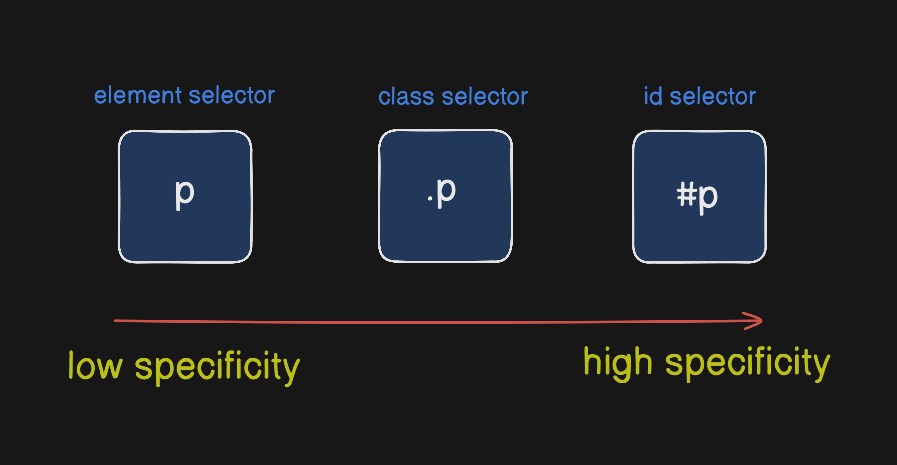
The browser follows a hierarchy of importance.
IDs are the strongest. They will override almost anything else.
Classes are in the middle. They will override a basic element selector.
Element selectors are the weakest.
So in our example, the paragraph would be red, because the class selector wins over the generic paragraph selector. It is more specific.


